Samsung Digital Signage Platform

Samsung VXT Content Management System

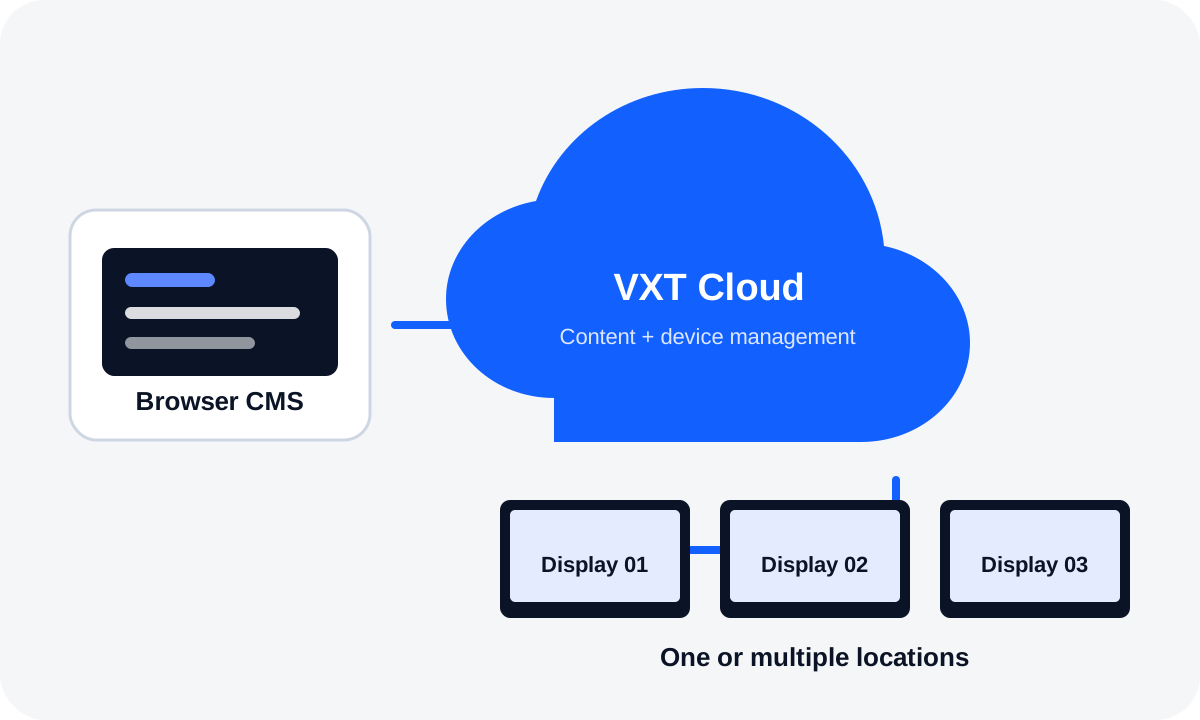
A cloud-based digital signage platform that combines content creation, scheduling, publishing and remote screen management in one environment.

Cloud CMSVXT CanvasScheduling & playlistsRemote managementSyncPlayEnergy management

One platform, four everyday jobs

What VXT helps signage teams do

Create

VXT Canvas provides templates, pre-loaded imagery, custom/company fonts and widgets so day-to-day signage content can be prepared without a separate authoring workstation.

Publish & schedule

Build playlists, schedule content, organise screens with tags and use SyncPlay where coordinated multi-screen playback is required.

Manage

Monitor and control compatible signage remotely, including screen settings and security controls for items such as USB, Wi-Fi, Bluetooth, network access and remote controllers.

Operations

Manage more than just content

VXT is useful when the customer needs both content workflow and operational visibility across one site or many locations.

Early warning

Samsung documents proactive warnings for conditions such as high temperature or weak network signals, helping administrators investigate before playback is affected.

Energy controls

Monthly energy reporting, brightness control, automatic on/off timers and holiday schedules can support more disciplined display operation.

Cloud deployment

Cloud-native deployment reduces the need to maintain a separate on-premise signage server and allows platform updates to be handled centrally.

Typical applications

Where VXT fits

Retail promotionsF&B menu boardsCorporate communicationEducation campusesHospitality public areasMulti-site signageLED display networksRemote support
Compatibility note: VXT capabilities depend on display model, operating system, firmware and selected service plan. Samsung's compatibility and licence structure can change, so PNSS reconfirms the current requirements before quotation.

PNSS implementation

A practical VXT rollout

1. Audit the display fleet

Confirm screen models, firmware, locations, orientation, network access and whether existing players or signage servers need to be retained or migrated.

2. Configure the workflow

Define administrators, workspaces, screen groups and tags, then prepare templates, playlists and schedules around the customer’s communications process.

3. Onboard, validate & train

Register compatible screens, validate playback and remote controls, then train the customer team on routine content publishing and device-management tasks.

PNSS migration note: For customers still operating Samsung MagicINFO, PNSS can review the existing server, player estate, content workflow and migration timing before recommending a VXT transition path.

Official references

Samsung VXT information

Use these manufacturer resources for the latest feature, compatibility, trial and commercial information.

Samsung VXT is a separately licensed cloud service. Current plans, trial terms, supported devices, firmware requirements and add-on services should be checked at the time of project design.

Planning a managed signage rollout?

PNSS can review the display fleet, network, screen grouping, content workflow, licensing, migration and administrator training before implementation.

PNSS AI diamond mascot