Image format
Native WUXGA 1920 × 1200 provides a 16:10 image format. Confirm that the source layout, screen proportions and required text size suit the room.

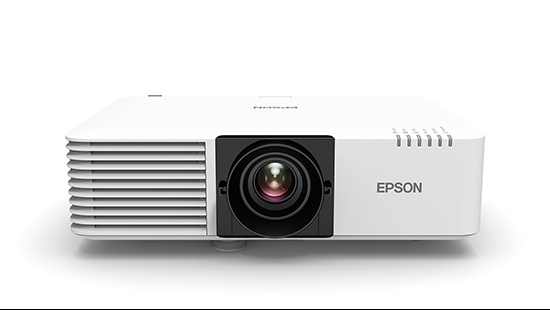
Product image published on Epson Malaysia’s EB-L520U page.
Epson projector · Malaysia supply & installation enquiries
A WUXGA laser projector with 5,200 lumens of colour and white output for business and education systems. PNSS can plan the image size, fixed-lens throw, mounting and source connections around the room.
For EB-L520U enquiries, PNSS can coordinate model selection, supply confirmation, screen, mounting, cabling, installation and testing.
Quick answers
Native WUXGA 1920 × 1200 provides a 16:10 image format. Confirm that the source layout, screen proportions and required text size suit the room.
Manual focus and 1.6× optical zoom provide a 1.35–2.20 throw range. Check the actual image width and lens-to-screen distance before fixing the mount position.
Epson Malaysia lists two HDMI inputs, HDBaseT and wired LAN. There is no built-in wireless; the ELPAP11 adaptor and Epson wireless presentation system are optional items requiring scope confirmation.
Epson lists 20,000 hours in Normal mode and 30,000 hours in Extended mode as light-source reference figures. They relate to declining brightness under stated conditions, not a maintenance-free guarantee for the whole projector.
Technical reference
| Model | EB-L520U |
|---|---|
| Malaysia product-code references | V11HA30040 / V11HA30052, as listed by Epson Malaysia |
| Projection system | 3LCD, RGB liquid crystal shutter |
| LCD size | 0.67-inch |
| Native resolution / aspect ratio | WUXGA 1920 × 1200 / 16:10 |
| White light output, Normal / Extended | 5,200 lm / 3,640 lm |
| Colour light output, Normal | 5,200 lm |
| Manufacturer contrast-ratio reference | Over 5,000,000:1 |
| Light source | Laser diode |
| Light-source-life reference, Normal / Extended | 20,000 / 30,000 hours; approximately until brightness reduces by half, subject to usage and environment |
| Lens / focus | Manual optical zoom / manual focus |
| Optical zoom | 1.0–1.60× |
| Throw ratio, Wide–Tele | 1.35–2.20 |
| Lens F-number | 1.50–1.70 |
| Focal length | 20–31.8 mm |
| Projected screen-size reference | 50–500 inches |
| Keystone / orientation | ±30° vertical / horizontal; 360° free orientation |
| Digital inputs | HDMI ×2 (HDCP 2.3); HDBaseT ×1 (HDCP 2.3) |
| Analogue RGB inputs | D-Sub 15-pin ×2 |
| Analogue video output | D-Sub 15-pin ×1 |
| Digital video output | None listed for this model |
| Audio inputs / output | Stereo mini-jack ×2 input; stereo mini-jack ×1 output |
| Built-in speaker | 10 W monaural |
| Network / control | Wired LAN RJ45 ×1 (100 Mbps); RS-232C D-Sub 9-pin ×1 |
| Wireless | No built-in wireless; optional ELPAP11 adaptor |
| USB | Type-A ×1 for supported PC-free/update/settings functions; Type-B ×1 for supported control/update functions |
| Dimensions excluding feet, W × D × H | 440 × 304 × 122 mm |
| Weight | Approx. 7.7 kg |
| Fan noise, Normal / Eco | 31 / 23 dB |
| Power supply | 100–240 V AC ±10%, 50/60 Hz |
| Power consumption at 220–240 V, Normal / Extended | 293 / 223 W |
| Operating temperature, single projector | 0–45°C at up to 2,286 m; 0–40°C at higher altitudes up to 3,048 m |
| Operating temperature, multi-projection use | 0–40°C at up to 2,286 m; 0–35°C at higher altitudes up to 3,048 m |
| Operating altitude | Up to 3,048 m; high-altitude mode above 1,500 m |
Use the exact model data for planning. Light-output and life figures depend on operating conditions; the centre light-output number is a separate reference and is not used here. Confirm Malaysia suffix, accessories, warranty, supply status and final mounting geometry during quotation.
Downloads & manufacturer references
Use these supporting Epson references alongside the specification and installation guidance on this PNSS page.
Use the exact EB-L520U column. Adjacent models differ in wireless and output features.
Official model information, detailed technical data and manufacturer support links.
Send the site, image size, projector position and signal requirements for a model-specific quotation.
Selection & installation
Start with the screen proportions, image width and the farthest viewing position. For a replacement project, compare the existing projector position and source connections before assuming that the screen, bracket or cabling can be reused. Decide whether presentation will be wired or require optional wireless equipment.
Frequently asked questions
Epson specifies WUXGA 1920 × 1200 with a 16:10 aspect ratio. Its native imaging resolution should be kept separate from any supported input-signal formats.
No. Epson Malaysia lists no built-in wireless and identifies the ELPAP11 as an optional wireless adaptor. The Epson wireless presentation system is purchased separately; confirm the required equipment and workflow in the quotation.
Epson lists a 1.35–2.20 throw ratio with 1.6× manual optical zoom. Image width multiplied by the selected throw ratio gives a preliminary lens-to-screen estimate; final placement must be checked against the model data and mounting conditions.
It avoids routine projector-lamp replacement, but it does not remove the need for system checks, ventilation and filter maintenance. Epson’s 20,000-hour Normal and 30,000-hour Extended light-source figures are approximate brightness-life references subject to usage and environment.
Provide the site, room dimensions, screen size and aspect ratio, available projector position, source equipment, cable route and operating needs. PNSS can assess supply, installation or replacement scope and verify the exact Malaysia configuration.
System dependencies
A product is only one part of the deployment. Confirm the supporting components and infrastructure before final model selection or installation.
Dependency links are planning paths, not automatic compatibility claims. Exact model/SKU, interfaces, loading, firmware/software and accessories must be verified for the final project.
Image surface
Confirm size, gain/surface and room conditions.
Open related area →Physical integration
Confirm bracket/structure, alignment and safe service access.
Open related area →System design
Validate throw geometry and lens requirement where applicable, plus source/control transport.
Open related area →Product family navigation
Return to Epson Projectors, continue to the relevant solution, or open a selection guide without losing product context.
New project / active selection
Use the parent family and solution links to compare application fit. Current Malaysia availability, exact SKU, warranty terms and compatible accessories should be verified at quotation stage.
Existing installed product
Already installed? Identify the exact model and condition first, then verify lifecycle, parts/software support and the practical repair or migration path.
Open legacy & replacement support →Share the room, image size, quantity, presentation sources and project location. Confirm current Malaysia supply, exact SKU, accessories and warranty terms with PNSS before ordering.