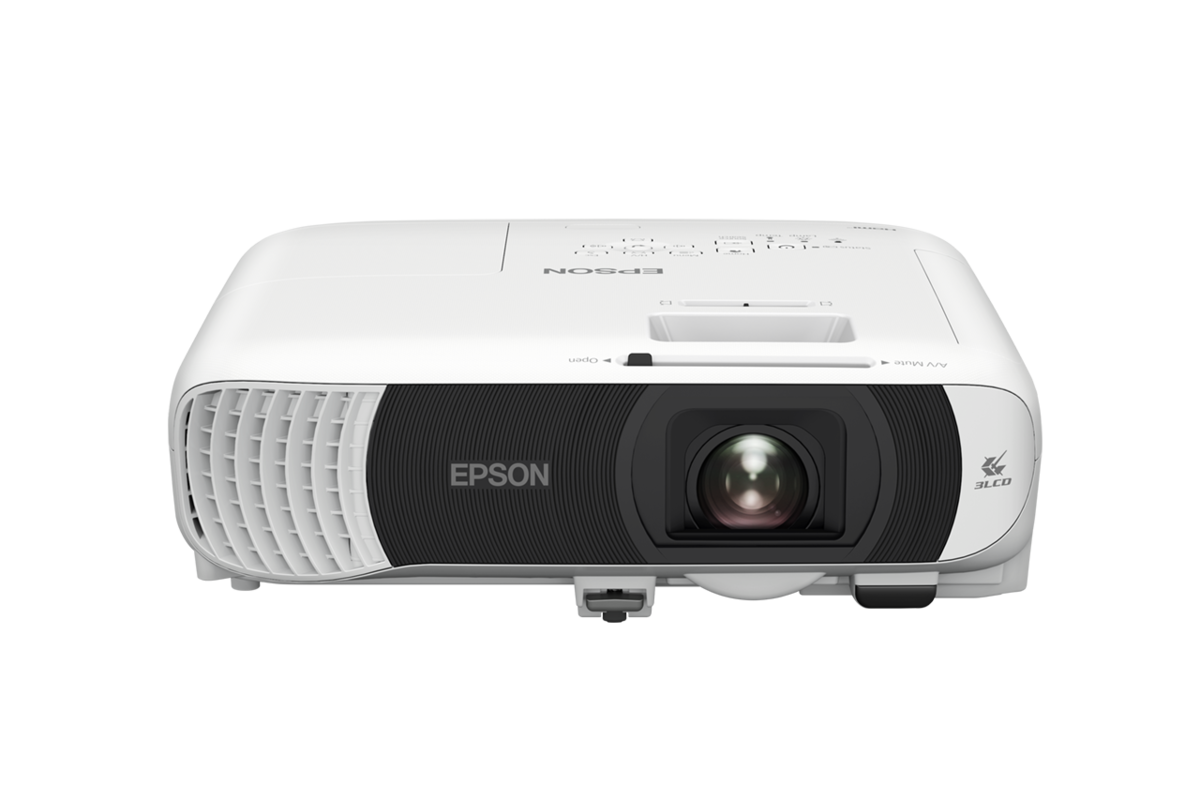
Epson projector · Corporate & Education · Malaysia reference

Epson EB-FH54 Specifications, Dimensions & Brochure

Exact-model technical reference for the Epson EB-FH54 Full HD wireless 3LCD projector, with installation information and official manufacturer resources.

Full HD1920 × 1080 resolution
4,100 lmColour / white brightness
309 × 282 × 90 mmDimensions excluding feet
1.30–2.09Throw / lens reference

Quick answers

EB-FH54 at a glance

Image

Full HD 1920 × 1080, 16:9, 4,100 lumens colour and white light output, and 16,000:1 contrast reference.

Wireless presentation

Built-in Wi-Fi 6 with Miracast, Apple AirPlay 2 and Epson iProjection support for compatible devices.

Installation

1.62× manual optical zoom, 1.30–2.09 throw ratio and ±30° vertical / horizontal keystone adjustment.

Lifecycle

230 W UHE lamp rated at 5,500 hours in Normal mode and up to 12,000 hours in Eco mode.

Technical reference

Epson EB-FH54 full key specifications

Epson EB-FH54 full key specifications
ModelEB-FH54
Malaysia product code referenceV11HB59052
Projection systemRGB liquid crystal shutter projection system (3LCD)
Native resolution / aspect ratioFull HD 1920 × 1080 / 16:9
Colour light output4,100 lm
White light output4,100 lm Normal / 2,300 lm Eco
Contrast ratio16,000:1
Light source230 W UHE lamp
Lamp-life reference5,500 hours Normal / 12,000 hours Eco
Throw ratio1.30–2.09
Projection lens typeManual optical zoom / manual focus
Lens F-number1.51–1.77
Focal length18.2–29.1 mm
Optical zoom / focus1.0–1.62× manual zoom / manual focus
Screen-size reference31″–304″
Keystone correction±30° vertical / ±30° horizontal
Digital inputsHDMI Type A × 2, HDCP 1.4
USBUSB Type A × 1; USB Type B × 1 for service / settings
WirelessWi-Fi 6, Miracast, AirPlay 2
Wireless securityWPA2 / WPA3-PSK and WPA2 / WPA3-EAP support
Speaker16 W monaural
Fan noise37 dB Normal / 28 dB Eco
Dimensions excluding feet (W × D × H)309 × 282 × 90 mm
WeightApprox. 3.1 kg

Specifications are based on the Epson Malaysia model page and are provided for planning reference. Product suffix, included accessories, warranty, stock and final Malaysia availability must be verified before quotation. Dimensions above exclude the projector feet.

Downloads & manufacturer references

EB-FH54 brochure, full specifications and support

Use the manufacturer resources below for the official datasheet and current support information. PNSS can also help translate the specifications into screen size, throw distance, mounting and cabling requirements.

Official EB-FH54 datasheet / brochure

Four-page Epson PDF covering product features, specifications, connectivity, dimensions and accessories.

Download official PDF ↗

Epson Malaysia full specifications

Current Malaysia product reference for detailed technical data and compatible accessories.

Open Epson Malaysia ↗

Epson Malaysia support

Manufacturer support reference for downloads, documentation and product assistance.

Open EB-FH54 support ↗

Installation guidance

What to confirm before selecting EB-FH54

EB-FH54 suits portable, meeting-room, training-room and classroom presentation use where Full HD detail and flexible wireless sharing are useful. Final suitability still depends on room light, intended image width, viewing distance and mounting position.

Screen-size planningThrow-distance calculationCeiling / desktop positioningAmbient-light assessmentHDMI cable-route planningWireless-network review

Frequently asked questions

Common EB-FH54 questions

What are the EB-FH54 dimensions?

Epson Malaysia lists 309 × 282 × 90 mm excluding feet. Approximate product weight is 3.1 kg.

Does EB-FH54 support wireless presentation?

Yes. It supports Wi-Fi 6, Miracast and Apple AirPlay 2, subject to compatible devices and network configuration.

Is EB-FH54 available in Malaysia?

The model is listed by Epson Malaysia. Current stock, suffix, warranty and delivery availability should be verified at quotation stage.

How is throw distance calculated?

Yes. Provide the room dimensions, required image size, front-wall photo and proposed projector position for installation planning.

System dependencies

Complete the projector deployment

A product is only one part of the deployment. Confirm the supporting components and infrastructure before final model selection or installation.

Dependency links are planning paths, not automatic compatibility claims. Exact model/SKU, interfaces, loading, firmware/software and accessories must be verified for the final project.

Image surface

Screen & viewing surface

Confirm size, gain/surface and room conditions.

Open related area →

Physical integration

Mounting & service access

Confirm bracket/structure, alignment and safe service access.

Open related area →

System design

Throw, lens, signal & control

Validate throw geometry and lens requirement where applicable, plus source/control transport.

Open related area →

Product family navigation

Continue from this model

Return to Epson Projectors, continue to the relevant solution, or open a selection guide without losing product context.

New project / active selection

Select through the current family

Use the parent family and solution links to compare application fit. Current Malaysia availability, exact SKU, warranty terms and compatible accessories should be verified at quotation stage.

Existing installed product

Assess support before replacing it

Already installed? Identify the exact model and condition first, then verify lifecycle, parts/software support and the practical repair or migration path.

Open legacy & replacement support →

Need an EB-FH54 quotation or installation check?

Project selection should consider the current Malaysia specification together with screen size, throw distance, mounting, signal distribution and control requirements.

PNSS AI diamond mascot