Approved first response
An AI Agent handles common questions and collects the information a human needs next.

Five practical usage scenarios
Each scenario below has a different trigger, data source, action, hand-off and success measure. PNSS defines these before connecting the future Explosoft subscription and AI Agent.
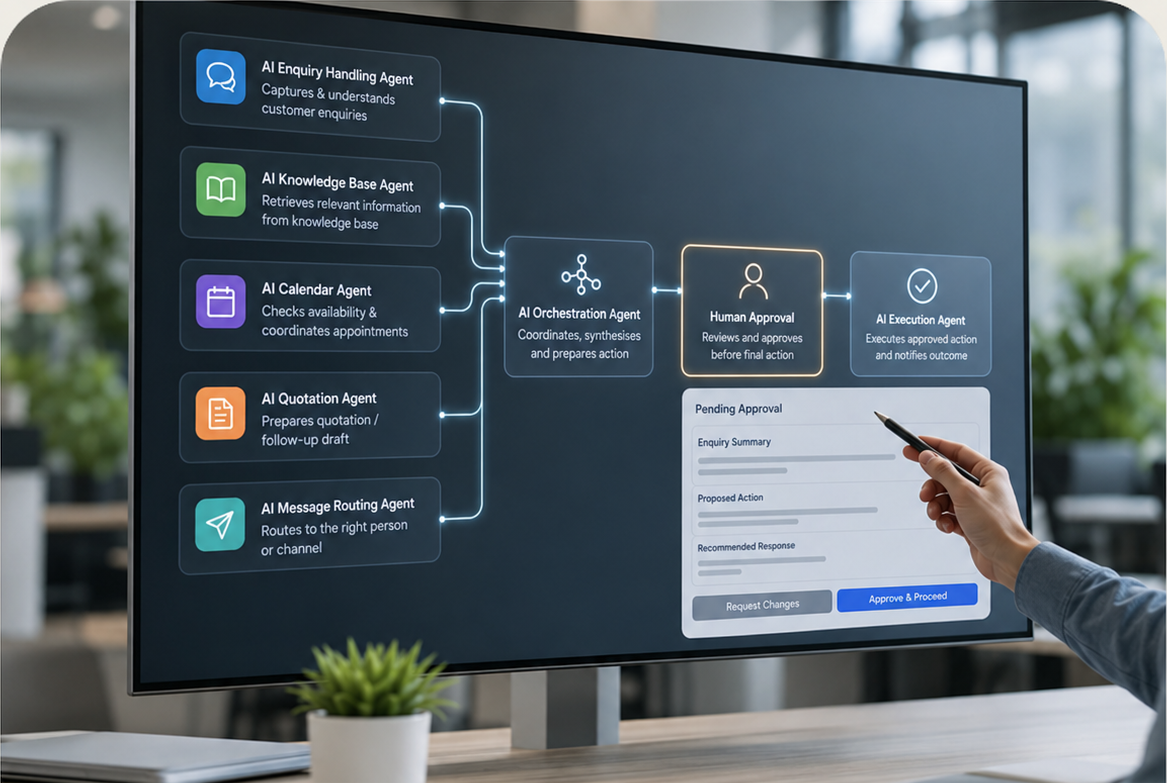
Automation with guardrails
A useful AI Agent knows what it may answer, what system it may read, what action it may prepare, when it must stop, and who approves the next step. PNSS documents the workflow and measurable outcome first, then prepares the integration path for the selected Explosoft subscription.
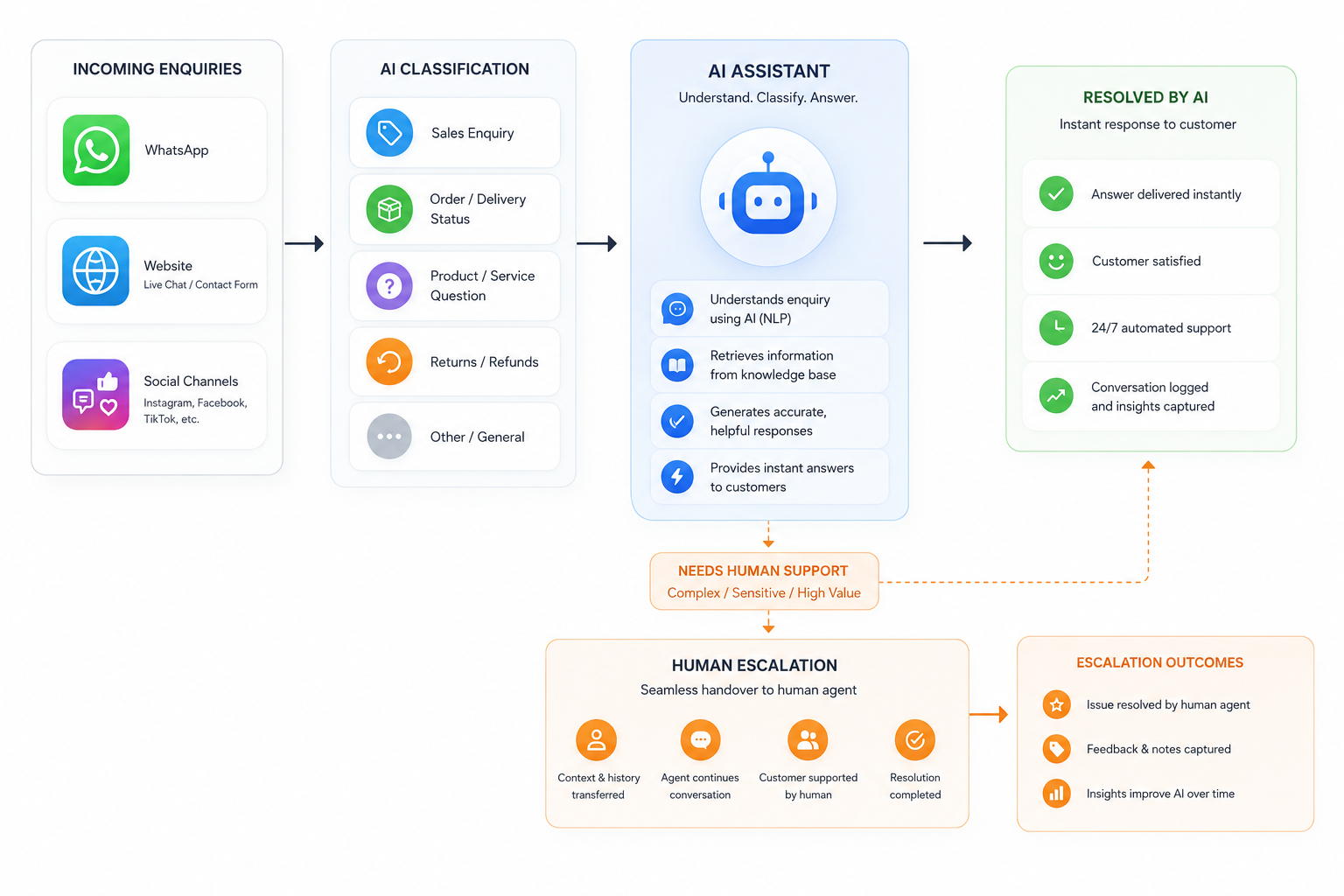
Answers approved questions, captures context and routes unresolved or sensitive cases to the right person.
The knowledge boundary and escalation rules are defined before the AI Agent is made public.
An AI Agent handles common questions and collects the information a human needs next.
Customers receive useful guidance outside office hours without hiding the human escalation path.
Triggered by website, messaging or form interactions within the approved channels.
Website AI Agent first, with additional channels added only after governance review.
Users get answers while staff receive structured context and escalation priority.
The Agent retrieves approved information, logs the conversation and transfers exceptions.
Success measures: response time, contained common enquiries, escalation quality and customer follow-through.
Discuss enquiry automation ↗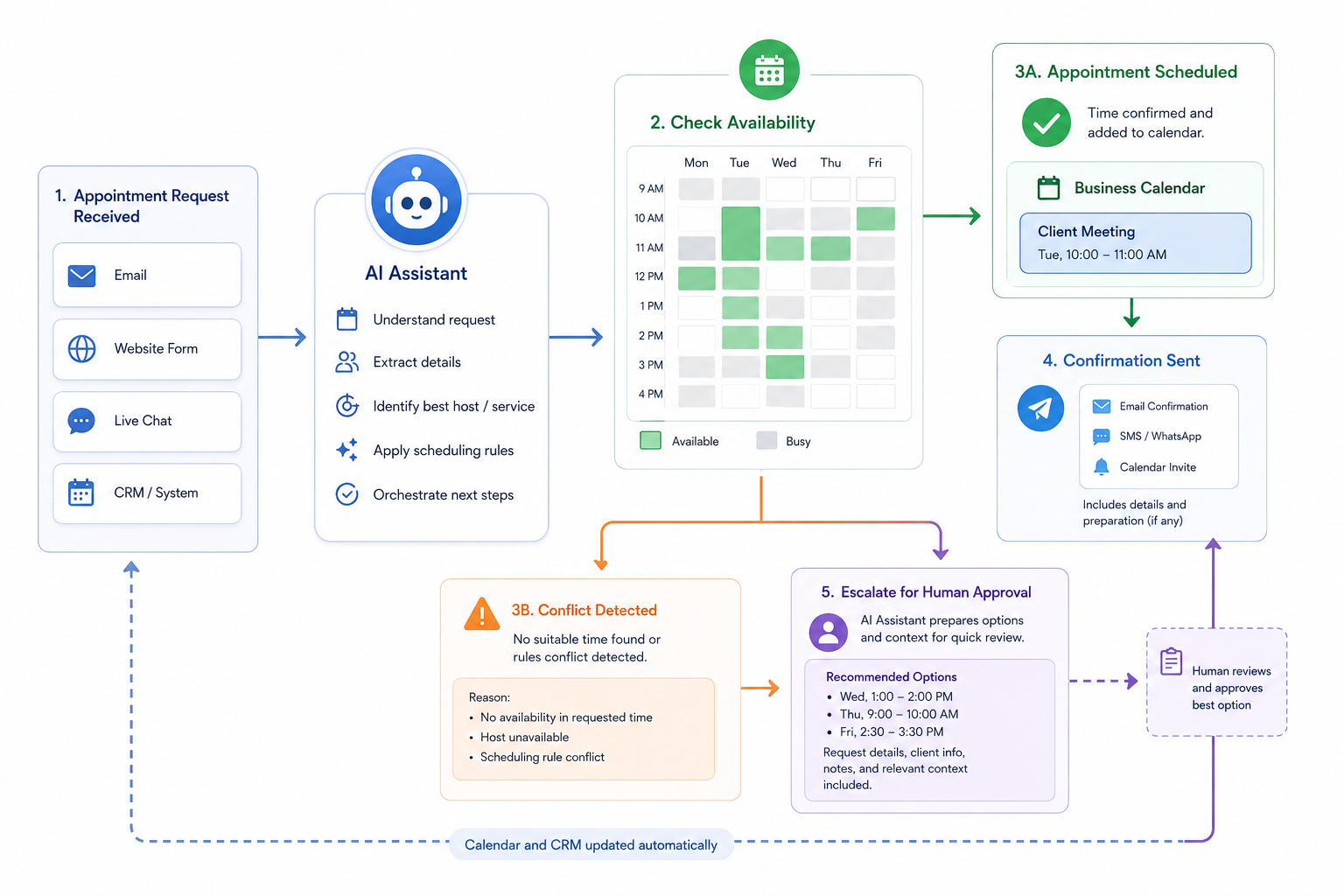
Collects consistent discovery information and helps sales teams prioritise relevant opportunities.
Qualification criteria are transparent and reviewed by the sales owner.
The Agent gathers agreed project facts and summarises gaps for the sales team.
Salespeople receive better context and can prioritise leads requiring prompt attention.
Used when a prospect asks for pricing, a demo, consultation or product advice.
Can connect to a CRM or approved lead register after data and permission review.
The Agent gathers facts; the designated salesperson owns qualification decisions.
Rules flag missing information, urgency and product fit without making unsupported promises.
Success measures: completed discovery fields, qualified meetings and time from enquiry to owner assignment.
Discuss lead qualification ↗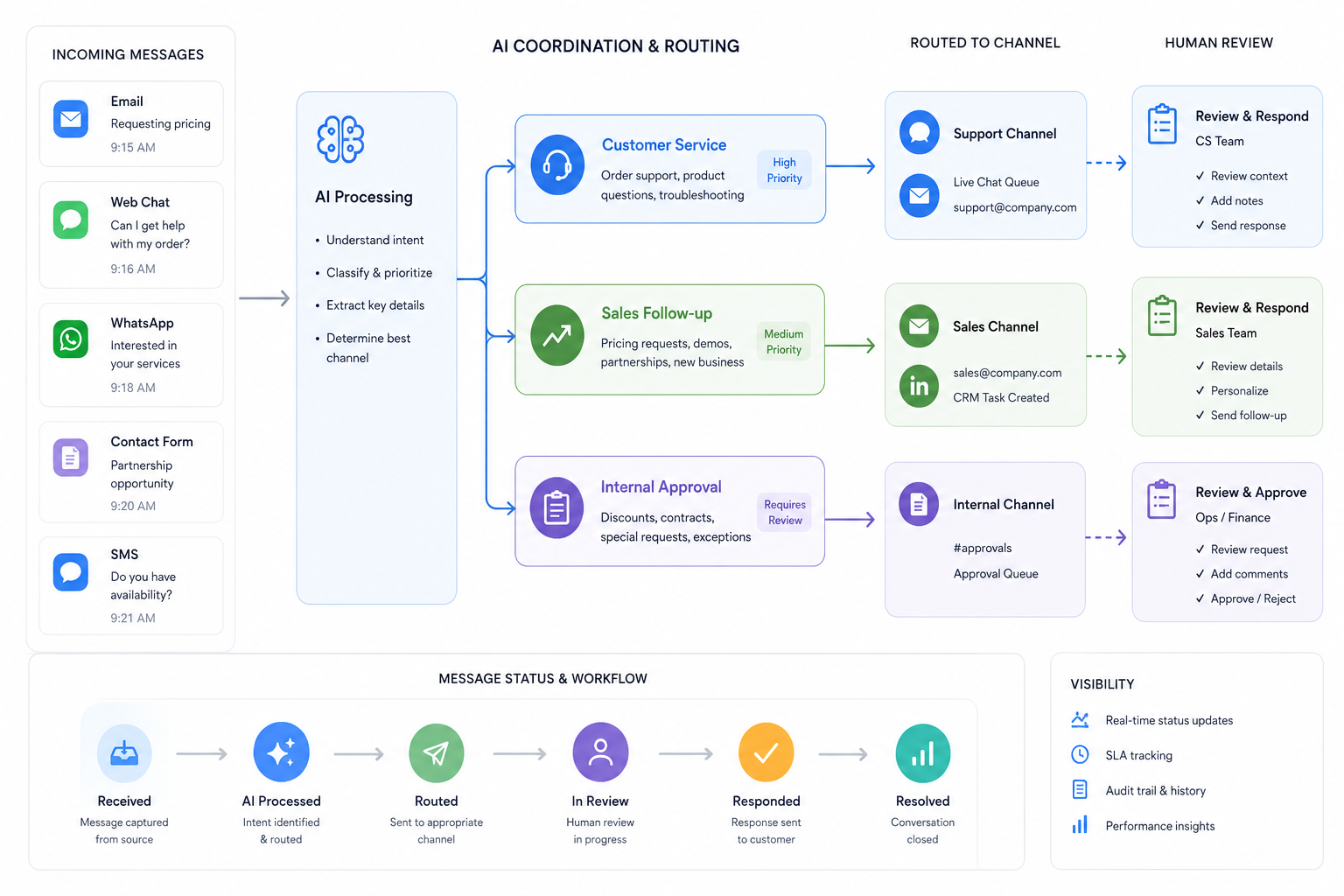
Prepares appointments and quotation inputs while keeping commercial approval with authorised staff.
AI may prepare and route information; final pricing, scope and commitments remain human-approved.
Proposes an appointment or prepares quotation data from validated lead information.
Structured inputs lower the risk of missing room, site, quantity or timeline details.
Triggered only when minimum project information and consent conditions are met.
Connectors are limited to the approved systems and actions for the chosen subscription.
Each hand-off identifies who checks availability, technical scope and commercial terms.
The Agent creates a reviewable draft and records approval before anything is sent externally.
Success measures: fewer incomplete scopes, faster scheduling and reduced quotation rework.
Discuss sales workflow ↗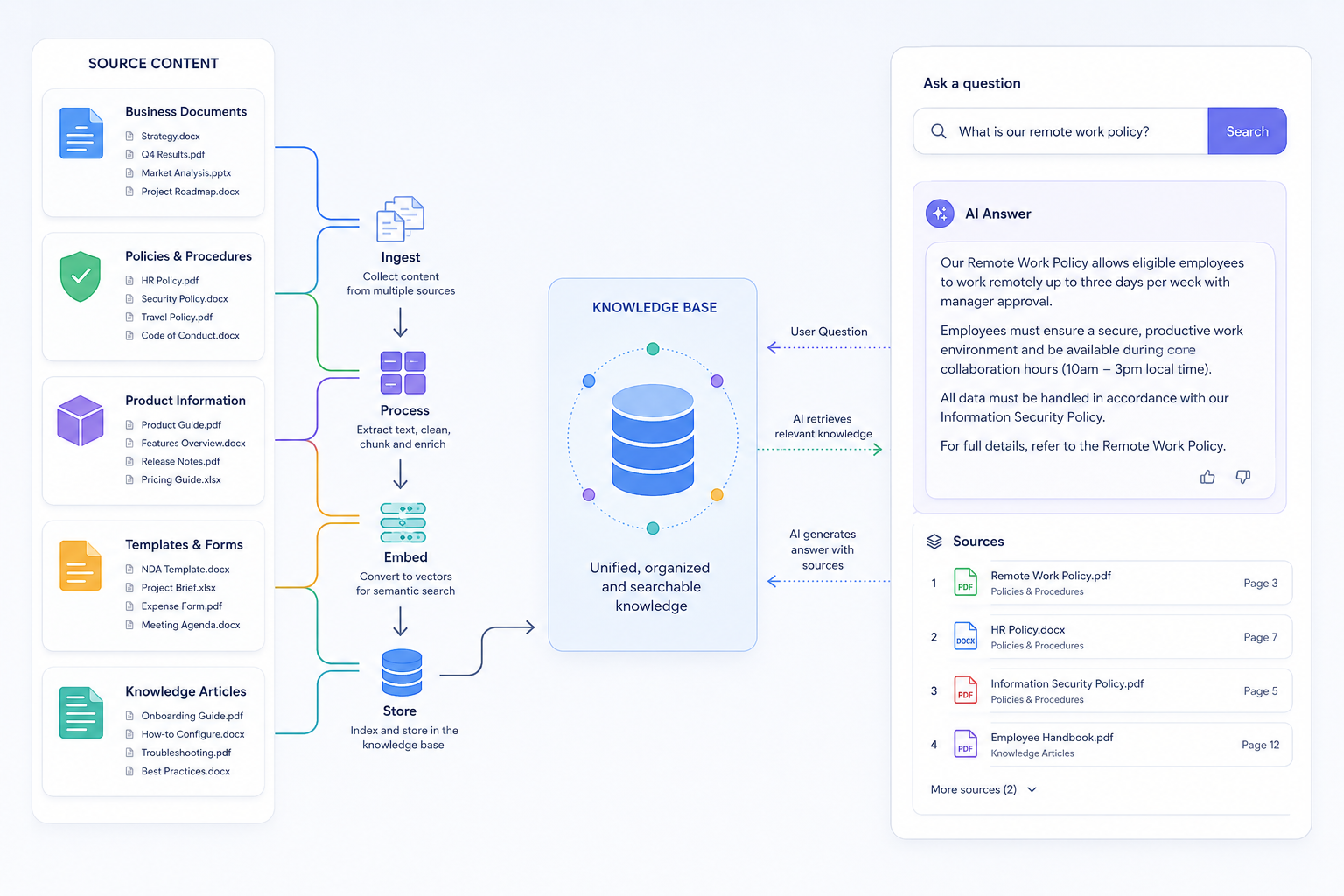
Helps authorised staff find approved procedures, product notes and organisational knowledge with source context.
The Assistant should cite the approved source and admit when information is unavailable.
Staff ask questions and receive summaries grounded in approved organisational sources.
Teams can locate the right document or procedure without relying on one person’s memory.
Useful for onboarding, troubleshooting, sales preparation and process checks.
Deployed within the permitted environment and connected only to authorised repositories.
Answers respect access permissions and avoid exposing material outside the user’s role.
Content owners maintain the sources; the Assistant retrieves, cites and escalates uncertain cases.
Success measures: search time, answer usefulness, source freshness and reduction in repeated internal questions.
Discuss knowledge automation ↗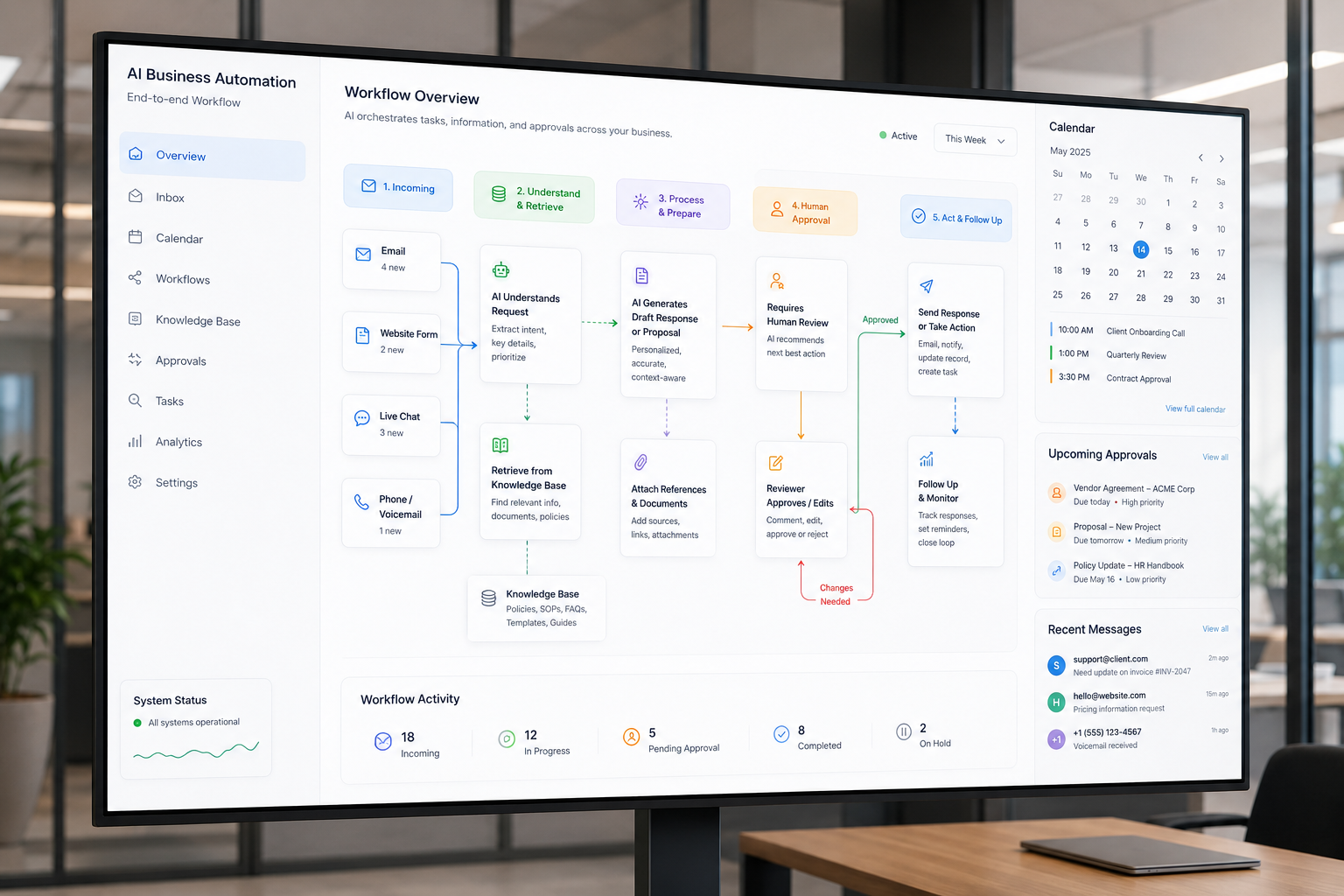
Turns approved operational data into recurring summaries, exceptions and review queues without automating accountability.
The report should show data boundaries, time period, source and unresolved exceptions.
The Agent compiles selected data and highlights items that require human attention.
Managers spend less time assembling routine reports and more time reviewing exceptions.
Daily, weekly or when a defined condition requires review.
Reports can be delivered to the permitted workspace, inbox or management channel.
Named people confirm the data, interpretation and action before business decisions.
The workflow preserves source references and logs human acknowledgement or correction.
Success measures: reporting time, exception detection, review completion and data-quality issues found.
Discuss reporting automation ↗Readiness check
Approved sources, owners and update responsibilities are identified.
What the Agent may read, prepare, send or never do is documented.
Every sensitive decision, exception and external commitment has a named reviewer.
PNSS AI Agent
PNSS will define the current process, desired result, required integrations and human checkpoints before connecting the subscription.